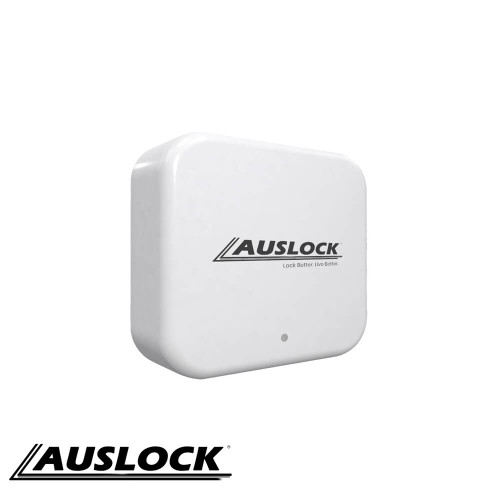
<p>The G2 Gateway from Auslock ensures that you can connect remotely to your Auslock smart locks. It is designed to give you full control of your front door security. Never worry about having family members or employees getting locked out of your house or office while you are away.</p>
<h4><strong>Smart Door Lock Remote Access</strong></h4>
<p>The Auslock G2 Gateway guarantees you constant control over who enters your house or office, even when you're away, as long as you have internet access. Once connected to your smart lock and Auslock app, you unlock a range of features:</p>
<ul>
<li>- Manage your Auslock smart lock remotely</li>
<li>- Grant access to visitors or guests</li>
<li>- Track the times your Auslock smart lock was opened</li>
<li>- Receive smartphone notifications when someone uses your Auslock smart lock to open the door</li>
<li>- Generate an admin eKey for added security and convenience</li>
</ul>
<h4><strong>Compatible with Google Home and Amazon Alexa</strong></h4>
<p>Known for bridging your smart locks to your home WIFI network, this Auslock G2 Gateway can take your security control access to another level. With the G2 Gateway, it makes it possible for you to program your smart locks to work with the voice-activated software from Amazon Alexa and Google Home.</p>
<h4><strong>Controlled Home Security</strong></h4>
<ul>
<li><span style="color: #0000ff;"><strong>FUNCTIONAL</strong></span> - It can easily be paired to your smartphone using the Auslock app</li>
<li><strong><span style="color: #0000ff;">CONVENIENT</span> </strong>- The Auslock G2 Gateway is designed to easily install directly to your modem</li>
<li><span style="color: #0000ff;"><strong>FULL CONTROL</strong></span> - Securely access your Auslock smart door lock remotely with an internet connection</li>
<li><span style="color: #0000ff;"><strong>INNOVATIVE</strong></span> - Program your Auslock smart door locks to seamlessly sync with Amazon Alexa and Google Home</li>
<li><span style="color: #0000ff;"><strong>ELEGANT</strong></span> - Its compact design ensures that your house or office interior style is not negatively affected</li>
</ul>
<h4><strong>Specifications:</strong></h4>
<ul>
<li><strong>Finish:</strong> White</li>
<li><strong>Requirement:</strong> Wireless internet connection</li>
<li><em>Controlled by the <strong>Auslock App </strong></em>(available on Android and iOS)</li>
<li><em>Compatible with <strong>Amazon Alexa</strong> and <strong>Google Home</strong></em></li>
</ul>
<h4><strong>Installation</strong></h4>
<table style="border-collapse: collapse; width: 100%;" border="1">
<tbody>
<tr>
<td style="width: 50%;">
<p>Click on the manual below to download the instructions for product management:</p>
<p> </p>
<p><a title="Auslock G2 Gateway Product Management Manual" href="/content/door/auslock/Auslock-G2-Gateway-Management-Manual.pdf" target="_blank" rel="noopener"><img src="/content/door/auslock/instruction-manual-blue.jpg" alt="Auslock G2 Gateway Product Management Manual" width="130" height="130" /></a></p>
</td>
<td style="width: 50%;">
<p>Click on the manual below to download instructions for the Auslock App set up and to learn more about the advanced features (attendance management, viewing of unlock records, and etc.) it provides:</p>
<p><a title="Auslock App Setup Instruction Manual" href="/content/door/auslock/Auslock-App-Instruction-Guide.pdf" target="_blank" rel="noopener"><img src="/content/door/auslock/instruction-manual-blue.jpg" alt="Auslock App Setup Instruction Manual" width="130" height="130" /></a></p>
</td>
</tr>
</tbody>
</table>
<p> </p>
<p>Connecting to voice-activated software:</p>
<table style="border-collapse: collapse; width: 100%;" border="1">
<tbody>
<tr>
<td style="width: 49.758%;">
<p>Click on the manual below to download the instructions to connect to <span style="text-decoration: underline;">Amazon Alexa</span>:</p>
<p><a title="Auslock Connect to Amazon Alexa Instruction Manual" href="/content/door/auslock/Auslock-Alexa-User-Manual.pdf" target="_blank" rel="noopener"><img src="/content/door/auslock/instruction-manual-blue.jpg" alt="Auslock Connect to Amazon Alexa Instruction Manual" width="130" height="130" /></a></p>
</td>
<td style="width: 49.758%;">
<p>Click on the manual below to download the instructions to connect to <span style="text-decoration: underline;">Google Home</span>:</p>
<p><a title="Auslock Connect to Google Home Instruction Manual" href="/content/door/auslock/Auslock-Connect-Google-Home-User-Manual.pdf" target="_blank" rel="noopener"><img src="/content/door/auslock/instruction-manual-blue.jpg" alt="Auslock Connect to Google Home Instruction Manual" width="130" height="130" /></a></p>
</td>
</tr>
</tbody>
</table>
[{"id":8014,"title":"Free-Shipping_1","icon-promo":"<div class=\"se-component se-image-container __se__float-none\">\n \n <figure>\n\n <img src=\"https:\/\/store-vf7rovdake.mybigcommerce.com\/content\/Product-Assets\/Icon Promos\/Free-Shipping_1.png\" alt=\"\" data-rotate=\"\" data-proportion=\"true\" data-rotatex=\"\" data-rotatey=\"\" width=\"\" height=\"\" data-size=\",\" data-align=\"none\" data-percentage=\"auto,auto\" data-index=\"0\" data-file-name=\"1_day_despatch.png\" data-file-size=\"0\" data-origin=\",\" style=\"\">\n\n <\/figure>\n<\/div>"}]
[{"id":8055,"title":"dispatch_time_5_to_8","dispatch-time":"<p style=\"line-height: 0.2;\"><strong>Item dispatched in 5-8 business days<\/strong><\/p>\n<p style=\"line-height: 1.2;\">Product is stocked in Australia and will be ready to ship to you in the advised timeframe.<\/p>"}]
[{"id":8182,"title":"auslock-warranty-1-year","warranty":"<h4><strong>Warranty<\/strong><\/h4> <p>1 year replacement warranty on material and workmanship defects. Conditions apply - See <a href=\"https:\/\/www.auslock.net\/warranty\/\" target=\"blank;\">Warranty Conditions<\/a>.<\/p>"}]

 Australian Dollar